
![IMG 20110828 080046[1]](https://dev.dragonmount.com/uploads/gallery/album_308/large.gallery_8431_308_1179110.jpg.7b2c2b4c5f9fd5163edcc3d2f8377f24.jpg "IMG 20110828 080046[1]")
![IMG 20110828 080046[1]](https://dev.dragonmount.com/uploads/gallery/album_308/small.gallery_8431_308_1179110.jpg.4c13912f331698c1ab5b51f0f6a0090d.jpg)
![IMG 20111002 135231[1]](https://dev.dragonmount.com/uploads/gallery/album_308/small.gallery_8431_308_331705.jpg.e327f6a488104cbac0ac05203463b78b.jpg)
![IMG 20111002 135112[1]](https://dev.dragonmount.com/uploads/gallery/album_308/small.gallery_8431_308_457343.jpg.efff35255626041432967e2f977ea6e4.jpg)
IMG 20110828 080046[1]

By Isaboe
- 1011 views
- View Isaboe's images
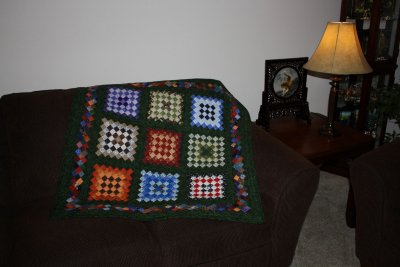
My son decided to do a photo essay on my quilting as I was working on this one....so I gave it to him as a graduation present. After all, he did get an A on the assignment so I figured it was only fitting that he have it. I think it's the only one I've ever done that is both pieced and quilted by machine. (I was in a hurry to get it done before he graduated.)
Recommended Comments
Join the conversation
You can post now and register later. If you have an account, sign in now to post with your account.
Note: Your post will require moderator approval before it will be visible.