

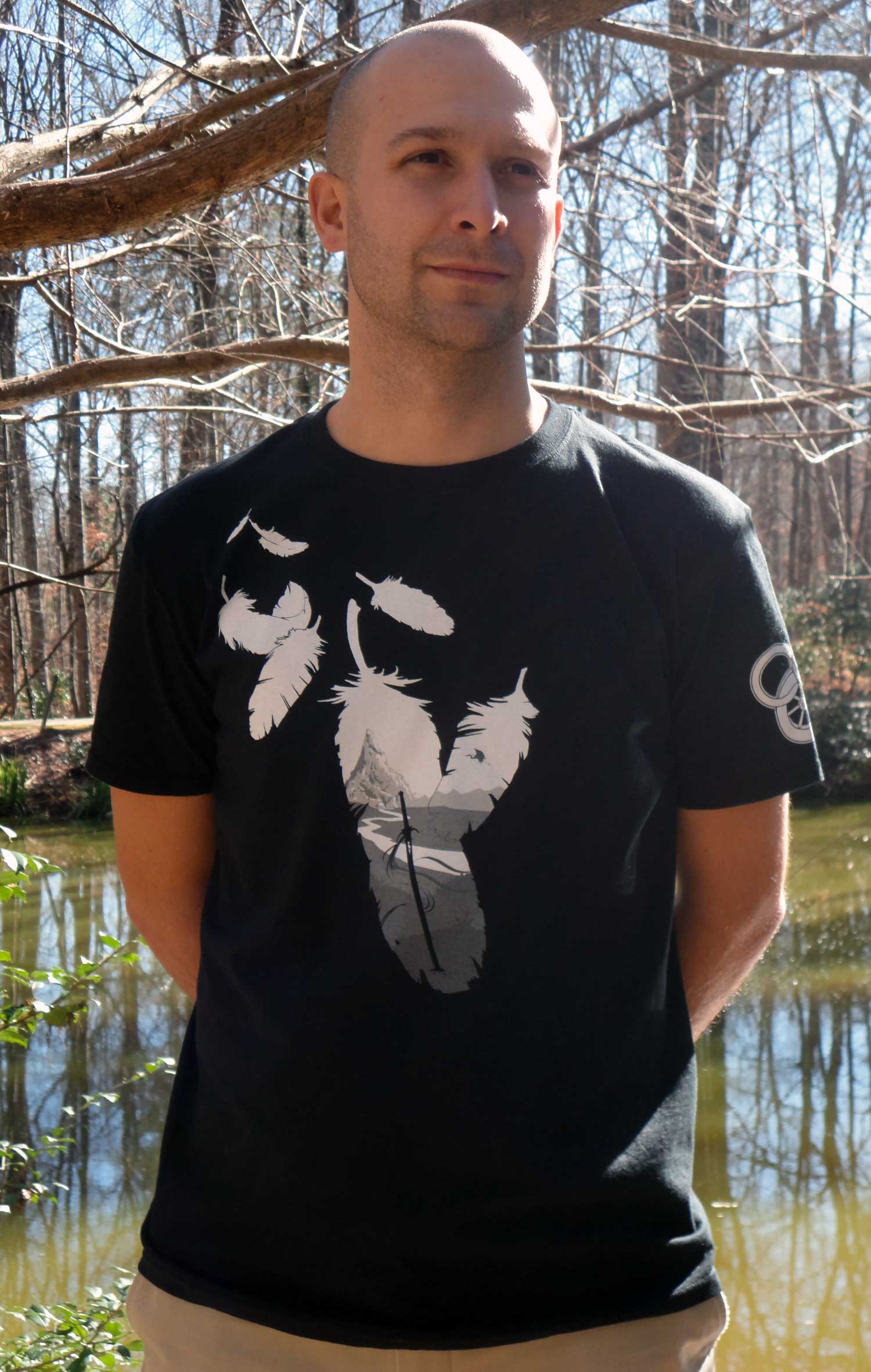
Introducing a new design from artist Paul Bielaczyc!
Ta’veren Tees is proud to have worked once more with officially licensed WoT artist Paul Bielaczyc on a new shirt, “Duty and Death,” now available for preorder at www.TaverenTees.com/dutyanddeath.

The 100% cotton tee can be preordered for a special price of $23 (regular $26) and will ship by March 7. All items ordered at the same time will be held and shipped with the new tee.
The art on the shirt shows a distant mountain – perhaps it is Shayol Ghul – with a heron marked blade in the foreground and a crane in flight, all framed by feathers. The concept alludes, of course, to the quote “Duty is heavier than a mountain, death lighter than a feather.” Though Rand takes up this mantra in the series, it is said to him by Lan Mandragoran and the sentiment fits both men’s stories, two journeys of burden and sacrifice.


Fact: In the real world, this phrase is very near one that is part of the first precept of the Imperial Rescript to Japanese Soldiers and Sailors.
To preorder your shirt, head over to www.TaverenTees.com/dutyanddeath now!
Recommended Comments
Join the conversation
You can post now and register later. If you have an account, sign in now to post with your account.
Note: Your post will require moderator approval before it will be visible.