

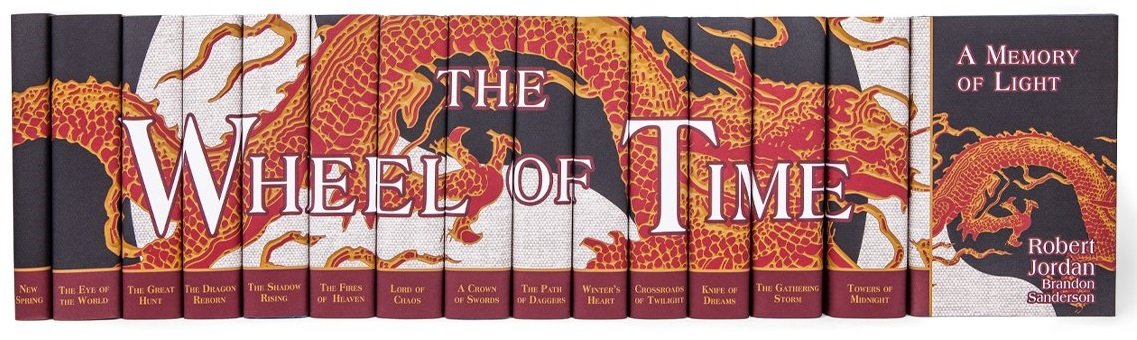
Do you want to breathe new life into your hardback set of The Wheel of Time novels? If so, Juniper Books has just released a set of dust jackets that encompass all fourteen books within the main series and includes New Spring, the prequel.
Juniper Books specializes in creating dust jackets that have a visual aesthetic. The Wheel of Time set shows an image of a dragon with the ancient symbol of the Aes Sedai in the background. The complete set together looks stunning and can be visually appealing on anyone’s bookshelf.
If you already have all the books in the series, you can buy only the dust jackets. If you don’t have all the books and you want them, now’s a good time to buy the books and the dust jackets all at once!
Though these are not officially released by Tor or by anyone on Team Jordan, they were made with their approval. Juniper Books said, “We are so thrilled that Robert Jordan's wife and editor Harriet McDougal and co-author Brandon Sanderson both love this design. Celebrating Robert Jordan's incredible story with this jacket design has been an honor for the Juniper Books team. The design pays homage to the Dragon Banner, set against a backdrop representing The Flame of Tar Valon and the Dragon's Fang - opposing elements that represent the themes of balance and the cyclical nature of time present in the series.”
To learn more about the other book series Juniper Books wares, you can look at their catalog here.
Would you like to have these covers on your shelf? Let us know in the comments!
Recommended Comments
Join the conversation
You can post now and register later. If you have an account, sign in now to post with your account.
Note: Your post will require moderator approval before it will be visible.