

Some exciting new (and favorite) products from Ta'veren Tees!
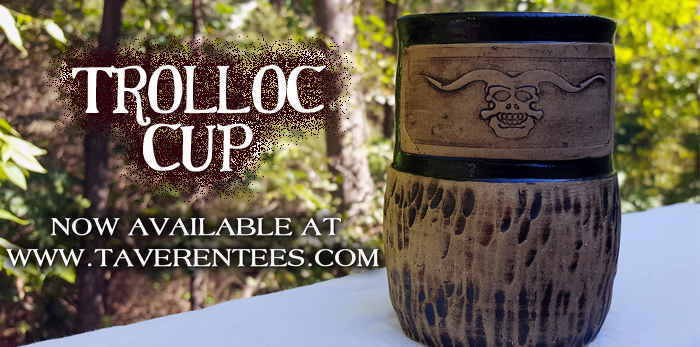
Happy Halloween, WoT Fans! We're excited to announce the release of a monstrously cool new product just in time for All Hallow's Eve: the Trolloc Cup, on sale now at TaverenTees.com/trolloccup!

This cup is microwave and dishwasher safe, holds approximately 16 oz, and is hand carved - no two mugs will ever be exactly alike. Check out the product page for more information.
All of our mugs are handcrafted by Sean Robinson, an independent artist from North Carolina who takes great pride in creating these mugs for fans of “The Wheel of Time,” as he is a fan of the series himself. So far, Sean has created mugs featuring the icons of the Ta’veren, the White Flame, and the Dragon’s Fang. All mugs are approved by Team Jordan and can be can be found at www.TaverenTees.com/featured.


And, if you are shopping for the holidays, remember all mugs take 7-14 business days to ship and the last shipments for Christmas orders will go out no later than December 15, so get your orders in early!
Recommended Comments
Join the conversation
You can post now and register later. If you have an account, sign in now to post with your account.
Note: Your post will require moderator approval before it will be visible.