

Hello!
The Wheel has spun, and now, April is almost upon us. With that, there are many exciting changes that are soon to take place in Dragonmount.
One important part of the month of April is JordanCon! To those of you who are lucky enough to go, congratulations! For the rest of us, there is Dragonmount.
Black Tower members have stumbled upon the all-important Secret Diary of Sarumon the White.
There are three new interesting threads up on the Movies and Games Discussion board. The first is about the game Thief. The second is about 300 Rise of an Empire. The third thread is about Divergent. Have you seen any of these movies or played these games? Join the discussion!
And in the TV Show and Sports Discussion board, there is a new thread of interest: Major League Baseball 2014. Are you a baseball fan? Do you have a favorite team, player, or least favorite of either? Here’s the place to talk about it.
And don't forget, today is the last day to submit nominations for the Hugo Awards. This is the last year Robert Jordan is eligible. Check out the article here for more details.
Now, an update from Dragonmount’s Twitter feed:
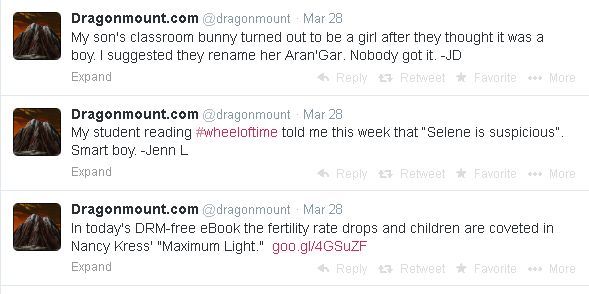
You can get daily updates about The Wheel of Time, Dragonmount, and other related topics by following our Twitter and Facebook profiles!
That wraps it up for March! Remember, as April starts, to sign in at your various Social Groups and have a safe JordanCon to all those are attending. Because of the convention, our regular weekly posts will be suspended for a week, so I'll be talking with you in two weeks.
Recommended Comments
Join the conversation
You can post now and register later. If you have an account, sign in now to post with your account.
Note: Your post will require moderator approval before it will be visible.